
Tasks
Tasks turn PromptScout from passive monitoring into a weekly growth workflow. Each week, PromptScout can recommend focused work from monitored prompts, competitors, citations, sources, website gaps, and Traffic or Search context, then keep receipts and watch windows for later comparison.
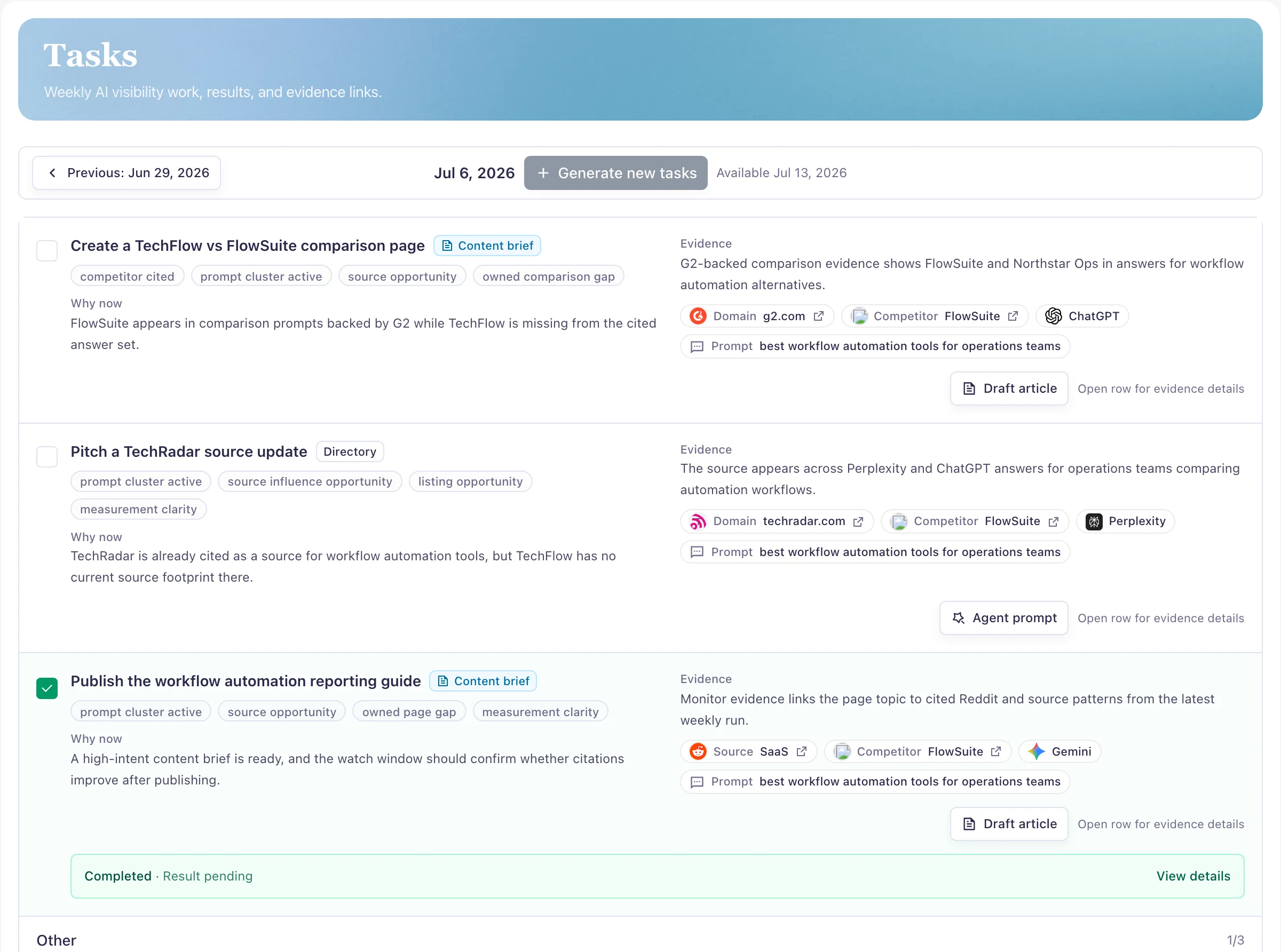
Three actions, not a generic backlog
The buyer job is deciding what to complete this week. PromptScout Tasks are generated per brand from the latest evidence window and are meant to stay small: a focused set of recommended actions instead of a broad opportunity backlog.
- Use the latest monitor run and insight batch as the evidence window
- Keep content and comparison work from crowding out technical, directory, community, or positioning work
- Treat Tasks as weekly execution, with Today and Morning brief providing daily context
Why now, Work, Evidence, Watch
Each Task explains the current reason it exists, the work to complete, the evidence that supports it, and what PromptScout will watch after completion. That structure keeps the recommendation specific enough for a user or agent to act on without inventing evidence.
- Why now: the observed prompt, source, competitor, provider, or website signal
- Work: the concrete page, directory, community, technical, or positioning action
- Evidence: compact prompt, citation, source, competitor, provider, and run chips
- Watch: the post-completion window and metrics to compare later
Receipts and watch windows keep it honest
Task completion is not the same as proven impact. PromptScout can store completion notes or artifact receipts, start a watch window, and later describe observed movement after completion without turning that movement into a causal claim.
- Completion receipts can be a URL, note, updated page path, submission proof, or verification note
- Watch windows compare the relevant evidence slice after enough time has passed
- Result copy stays non-causal: observed after completion, not promised by completion
Frequently asked questions
How many weekly Tasks does PromptScout generate?
The V1 contract is three recommended Tasks per brand when the weekly batch is eligible and the user has access to the Growth-tier workflow.
What is a watch window?
A watch window is the period after a Task is completed where PromptScout compares later evidence against the original scope and reports observed movement with non-causal language.
Related Features
Morning brief
Use Morning brief to scan AI Visibility Changes, Tasks, Traffic context, prompts, competitors, and citations that need attention today.
Explore Morning briefAI Visibility Changes
Review prompts, competitors, citations, sources, and provider-level answer movement that changed across PromptScout monitor runs.
Explore AI Visibility ChangesContent briefs
Create task-scoped PromptScout Content briefs from monitored prompts, website gaps, competitor signals, citation hints, and source evidence.
Explore Content briefs