
PromptScout Blog
Claude Opus 5.5: Changes, Uses and AI Visibility
What changed in Claude Opus 5.5, how marketers can use its search and Skills, and how to check brand mentions, citations, and website access in Claude.
Published

Founder
Building PromptScout to help teams understand how AI assistants cite, mention, and recommend their brands.
Your brand in AI answers
See where AI recommends your competitors.
Start with a free visibility check. Paid plans add monitoring; Growth adds Opportunities.
Paid monitoring: ChatGPT Gemini AI Overviews Perplexity Bing Copilot
Claude Opus 5.5 is Anthropic's model for extended coding, research, and knowledge work. For marketers, it can help compare documents, check product claims, and prepare content briefs. Its web search and citation tools also make it relevant to brand discovery: buyers can use Claude to research a category and compare products.
Summary
Evaluate Opus on work your team already does, such as checking a comparison page against current product documentation. Judge the result by the errors it finds, the claims it misses, and the review time it saves. Anthropic reports improvements in efficiency and communication; testing it on familiar material lets you assess those claims for your own work.
For AI visibility, examine the buyer's answer: how Claude describes your brand, whether it recommends it, and which pages it cites. Keep the model, search setting, and question with that record. PromptScout does not monitor Claude. You can review Claude answers manually and use the same definitions when comparing them with supported-provider results.
What changed in Claude Opus?
Anthropic released the model in September, reporting clearer writing, faster output, and lower operating costs. Those changes matter when you use Claude for long research or content-review tasks. Developers access the model through an application programming interface (API). The rates below show unit costs; the bill also depends on token use and caching. In the Claude app, your subscription and usage limits determine access.
| Documented setting | Opus 5 | Opus 5.5 |
|---|---|---|
| Standard input price, per million tokens | $5 | $4 |
| Standard output price, per million tokens | $25 | $20 |
| Default reasoning effort | High | Medium |
| Can thinking be disabled? | Yes, at high effort or below | No |
Source: Anthropic's migration guide. The model specification lists a million-token context window, text and image input, and text output. The release date was September 22, 2026.
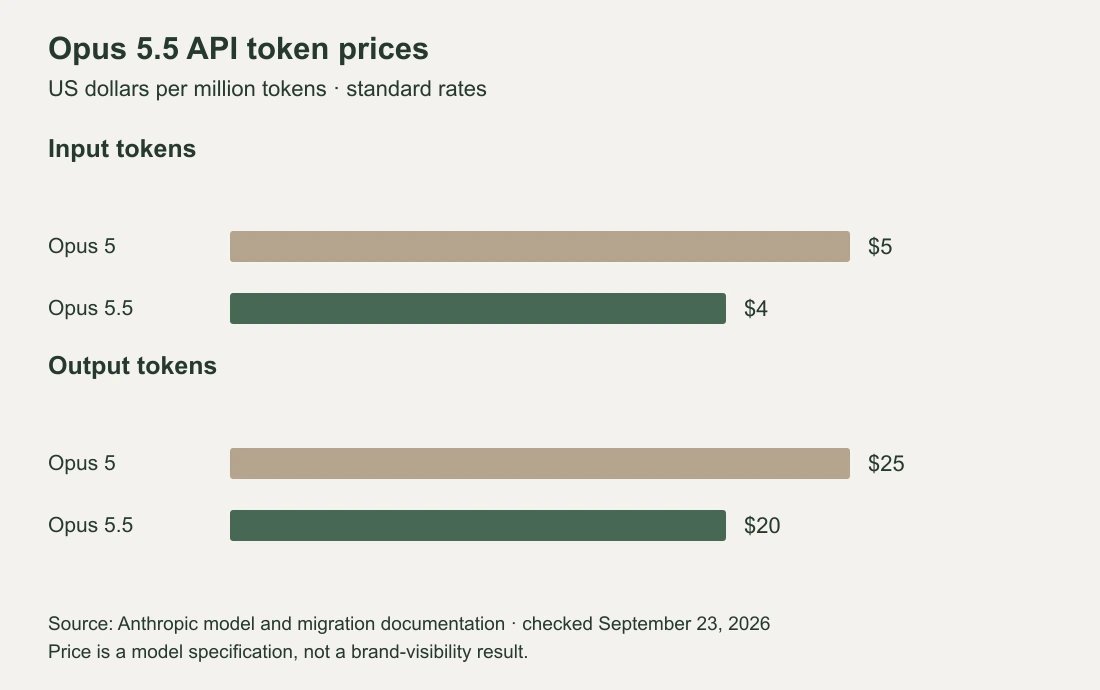
Standard API prices per million tokens, checked September 23, 2026.
Both input and output rates are lower, which reduces token costs for recurring tasks such as reviewing a library of comparison pages. When comparing versions, use the same effort setting and track the time spent correcting the output. Teams with an API integration should also review Anthropic's changes to tool use and response handling.
Use Claude to check claims and content gaps
A useful marketing task gives Claude evidence to inspect and a concrete deliverable. For example, a consultant reviewing a software comparison page could supply the draft, current product documentation, and the buyer questions the page is meant to answer:
Review this comparison page against the attached product documentation. Quote each claim that is outdated, unsupported, or missing a condition. Give the source that supports your correction. Then list buyer questions the page leaves unanswered. Keep unresolved conflicts separate from suggested edits.
That output gives an editor something to verify. It is more useful than asking for a broadly “optimized” rewrite, which leaves the model to decide what accuracy, coverage, and success mean.
Agent Skills let you package a recurring procedure with instructions and reference material. A claim-review Skill could contain approved terminology, a source hierarchy, and a report format. In supported environments, Claude can use it to repeat your review process. Check its cited passages before accepting changes.
How Claude mentions and cites brands
A brand mention is a company or product name in the answer. A recommendation presents it as a suitable choice. A citation is a reference attached to the answer. A brand can be discussed without a link, and a page can be cited without its product being recommended.
Claude's web search tool returns cited material when used. Inspect the sentence beside each citation and open the linked page. A link to a pricing page, for example, should support the price or plan claim being made. If the answer names an old plan, save that exact statement and check whether the linked source is outdated too. This gives you a specific correction to investigate.
| Observation | What to record |
|---|---|
| Brand named without a citation | The sentence and whether it recommends, describes, or merely mentions the brand |
| Your page cited | The URL and the claim it is meant to support |
| Competitor recommended | The stated reason and the linked sources, if any |
| Brand absent | The complete answer and whether web search was observed |
Keep Claude app answers and API tests labeled separately. Anthropic publishes the app's system prompts, which do not apply to the API. Instructions, available tools, and conversation context can differ.
Make your pages useful to Claude search
Begin with access. Anthropic distinguishes Claude-SearchBot, Claude-User, and ClaudeBot. They serve search, user-requested retrieval, and potential training respectively. If you want public pages discoverable through Claude search, review the search and retrieval settings instead of assuming a training-crawler rule covers them all.
Next, inspect the page that should answer the buyer's question. For appointment software, “supports recurring bookings” leaves several questions open. Does that include reminders, rescheduling, and several locations? Put the supported behavior and its limits in the page text, with a link to the relevant documentation. Clear answers help a buyer assess the product and give a reviewer something concrete to check against Claude's description.
Repeat that review after a model release, starting with the questions where your product is missing or described incorrectly.
Claude visibility checklist
Start with an unbranded buyer question, such as “Which field-service scheduling tools fit a small team that needs recurring appointments?” Use separate questions for named-product comparisons. A question that supplies the brand name tests a different kind of visibility.
- Save the exact question, date, language, model shown, and relevant conversation context.
- Record whether web search was observed, not observed, or unknown. Preserve the full answer and displayed links.
- Classify the brand's appearance using the definitions above. Check whether each cited page supports the nearby claim.
- Repeat the same questions under comparable settings. Record any site edits between checks before interpreting a change.
A single saved answer is useful for finding an inaccurate claim. A pattern across repeated checks is a better basis for deciding which content problem deserves work. Keep failures and incomplete answers separate from completed answers that omit your brand.
Using PromptScout
PromptScout monitors ChatGPT, Gemini, Google AI Overviews, Perplexity, and Bing Copilot. It does not monitor Claude. Use Prompts to review your tracked questions, Monitoring for completed runs, and Sources to inspect linked pages for supported providers. Keep manual Claude observations in a separate log. If you compare the results, use the same questions and mention definitions, and show which provider each answer came from.
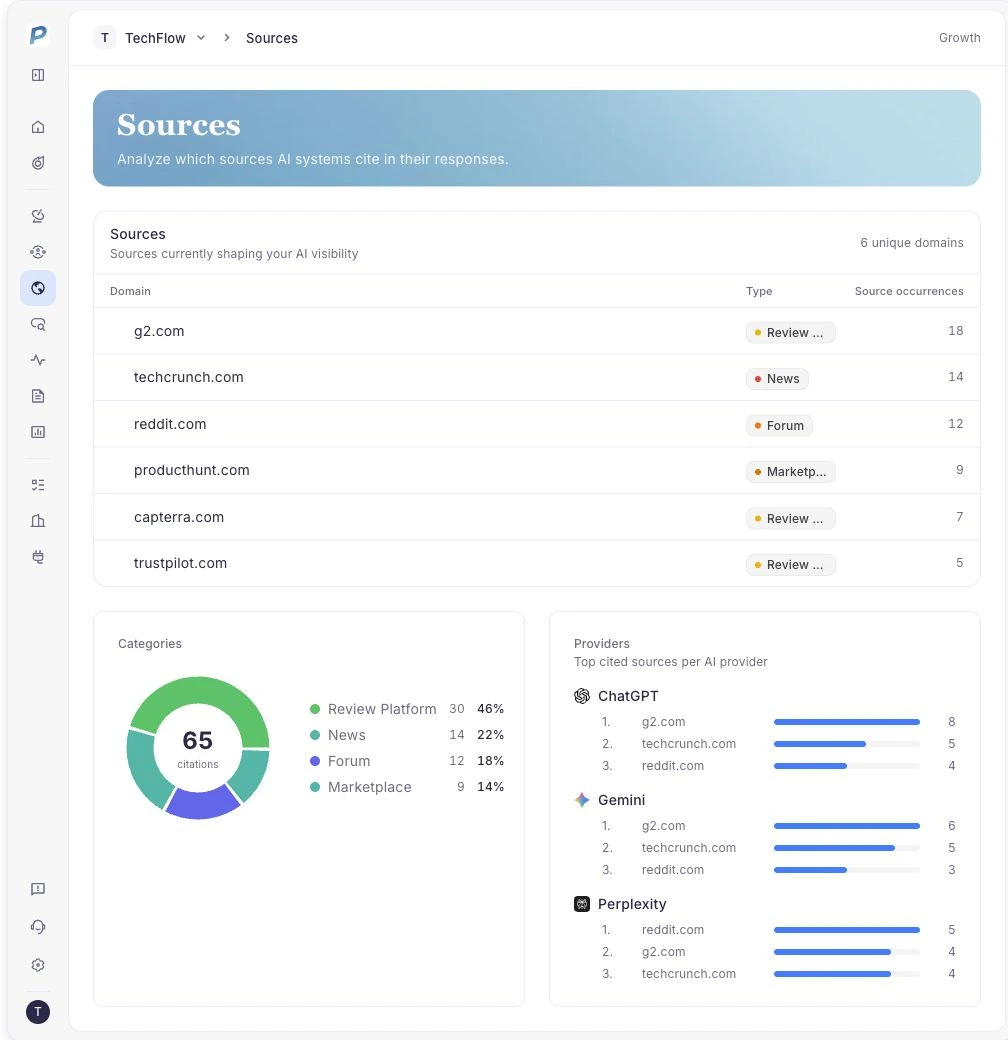
Public demo values in the Sources view; no Claude results are shown.
Notes on the data
Specifications and API prices were checked against Anthropic's documentation on September 23, 2026. The chart compares standard token rates; total costs depend on usage and caching. Communication and efficiency claims come from Anthropic's announcement. The product screenshot shows public demo values for supported providers.