PromptScoutPromptScout
  • Pricing
  • Contact

Documentation

Foundations

  • Overview
  • Getting Started

Configuration

  • Brand
  • Prompts
  • MCP
  • Search data
  • Cloudflare Traffic
  • Vercel Traffic

Daily workflows

  • Weekly workflow
  • Monitoring
  • Competitors
  • Sources
  • Analysis
  • Website
  • Traffic
  • Reports
  • Content

Product resources

PromptScout blogPrompt tracking guideStart Now
Browse documentation

Foundations

  • Overview
  • Getting Started

Configuration

  • Brand
  • Prompts
  • MCP
  • Search data
  • Cloudflare Traffic
  • Vercel Traffic

Daily workflows

  • Weekly workflow
  • Monitoring
  • Competitors
  • Sources
  • Analysis
  • Website
  • Traffic
  • Reports
  • Content

Product resources

BlogPrompt trackingStart Now
Loading documentation
PromptScoutPromptScout

PromptScout shows whether AI answers mention your brand, recommend competitors, and cite your pages across ChatGPT, Gemini, Google AI Overviews, Perplexity, and Bing Copilot.

  • Follow on X (Twitter)

Product

  • Features
  • Pricing
  • Roadmap
  • What's New
  • How It Works
  • FAQ

Solutions

  • For Founders
  • For Agencies
  • For SEO Professionals
  • For Content Teams
  • For PR & Brand Teams
  • For Marketing Teams

Resources

  • Free AI Visibility Check
  • AEO & GEO Guide
  • Docs
  • Blog
  • Free Tools
  • AI Brand Checker
  • Prompt Tracking

Compare

  • vs Manual Tracking
  • vs Otterly.ai
  • vs Peec AI
  • vs Profound
  • vs GenRank
  • All Comparisons

Company

  • About
  • Contact
  • Support
  • Featured On

Microsoft and Bing Copilot are trademarks of the Microsoft group of companies. PromptScout is not affiliated with or endorsed by Microsoft.

2026 PromptScout. All rights reserved.

Privacy PolicyCookie PolicyTerms of Service
  1. Home
  2. /
  3. Docs
  4. /
  5. Sources

Daily workflows · Updated September 12, 2026

Inspect sources and citations

Review source URLs, page types, brand quotes, and competitor language from monitored answers.

On this page
  1. Inspect a source
  2. Compare domains and page types
  3. Read positioning attributes
  4. Use the evidence

Inspect a source

Sources groups the URLs returned with monitored answers by domain, provider, and category. Open a source to inspect the page and the responses associated with it.

  • Displayed citation: a link shown with the provider's answer.
  • Returned source URL: a page in the provider's source list. It may not have appeared as a displayed citation.
  • Linked brand mention: a link attached to a brand name. The linked-domain view keeps this separate from answer citations.

A source URL does not establish that the provider read, trusted, or used the page. Use the recorded source type and original answer to interpret it.

Compare domains and page types

  1. Choose questions where your brand or a competitor appears.
  2. Review recurring domains and individual URLs.
  3. Compare source categories, such as reviews, documentation, comparison pages, and forums.
  4. Open relevant pages and record which claims address the buyer's question.

Reddit details can include threads, communities, or authors when the returned URL and available enrichment support them. Missing enrichment means those details are unavailable.

Read positioning attributes

Competitor language to watch shows phrases from the latest generated analysis, with provider context and available excerpts. Positioning attributes describe qualities assigned to a brand, such as an audience, use case, or product capability.

Check the original wording before treating an attribute as accurate. Some answers contain no useful positioning detail. Read the positioning feature page for examples.

Use the evidence

Source analysis and positioning attributes are included from Starter. Compare the pages and descriptions with your own content to find claims that need clearer support.

Growth and higher add Opportunities and Content Briefs. Use the cited or returned URL that supports the specific content decision. A source gap can suggest work to investigate; it does not prove why a competitor was recommended.
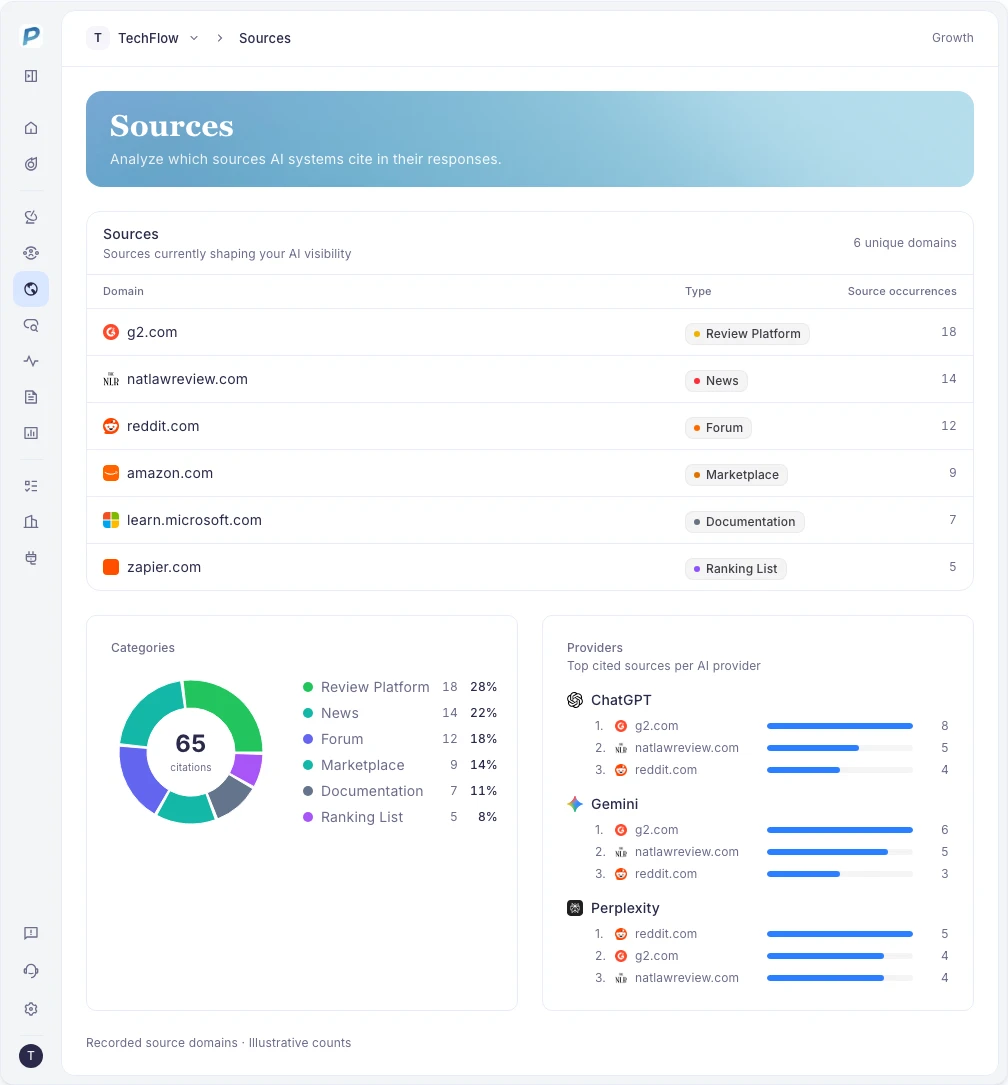
PromptScout sources analysis table with citation sources and categories
Example from the PromptScout application. Open the image for detail.

On this page

  1. Inspect a source
  2. Compare domains and page types
  3. Read positioning attributes
  4. Use the evidence
AI Citation & Source Tracking

Related guides

  • Weekly workflow
  • Competitors
  • Website
  • Analysis
  • AI Brand Monitoring Platform
  • AI Citation & Source Tracking
PreviousCompetitors
NextAnalysis

Track your own brand.

Start NowSee pricing