
PromptScout Blog
More Links Inside Google AI Overviews: What Brands Should Measure
Google AI Overviews are showing more links inside answers. Learn how to separate inline links, source cards, brand mentions, and visits in a practical audit.
Published

Founder
Building PromptScout to help teams understand how AI assistants cite, mention, and recommend their brands.
Your brand in AI answers
See where AI recommends your competitors.
Start with a free visibility check. Paid plans add monitoring; Growth adds Opportunities.
Paid monitoring: ChatGPT Gemini AI Overviews Perplexity Bing Copilot
If Google puts more links inside AI Overview answers, brands gain another place where a page may be visible. Measure that placement separately from source cards, brand mentions, and visits. A linked page can help a reader check a claim; its presence alone does not show that anyone opened it or that Google recommended the business.
Summary
A recent industry observation suggests Google AI Overviews are showing external links within the answer text more often. That makes link placement worth recording when you review an AI Overview. Keep the exact search question, the linked page, and where the link appeared. Then check whether the answer names your brand and whether search traffic to that page changes. Those are different results.
You don't need a new kind of markup for this. Google's guidance for AI features points back to ordinary Search eligibility and useful, accessible content. The immediate job is to see what the answer showed and decide whether a cited page actually serves the reader's question.
What changed in the answer
On September 23, Search Engine Roundtable and Search Engine Watch reported a Peec AI observation: more AI Overviews in its tracked set contained external links placed within the answer text.
Google already describes AI Overviews as answers with links to supporting websites. Where a link appears can change how a reader encounters it: next to a specific claim in the answer or in a separate source panel.

Read the answer and its links
Suppose a buyer asks, “Which appointment software works for a repair shop with two locations?” The AI Overview names one vendor and places a link to a comparison page beside a claim about scheduling. The vendor mention tells you who appeared in the answer. The link tells you which page supported that claim. If the same page appears only in a source panel, record that placement instead. Neither view tells you whether the buyer visited the page.
Save the full answer with the date and exact question. Keep the linked URL, its position, and the wording around any brand mention. If your business is absent, read the linked comparison page before changing your own: the useful gap may be a missing feature detail, an outdated claim, or independent evidence the page provides.
Across 82 tracked questions from August 25 through September 23, 2026 UTC, our monitoring set contained 535 successful Google AI Overview answers; 463 included at least one source URL. That shows how often sources were present. To assess inline links, look at where each link appeared in the answer.
A link is not a visit
Pew Research Center studied U.S. Google browsing in March 2025. It found that users clicked a link inside an AI summary in 1% of visits to result pages with a summary. Traditional-result clicks occurred in 8% of those visits, versus 15% of visits to pages without a summary.
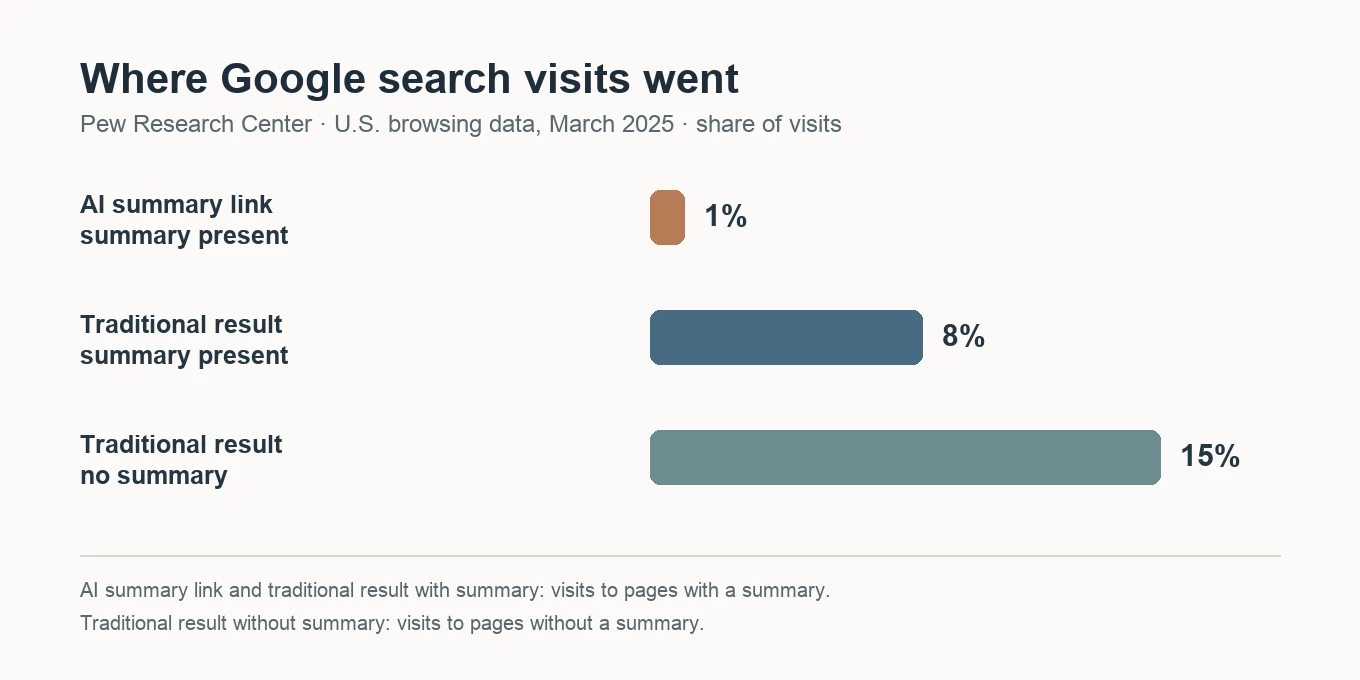
Share of Google result-page visits with each click destination in Pew's March 2025 U.S. browsing study. The first two bars use visits to pages with an AI summary; the third uses visits without one.
A new inline link may improve how clearly a source is presented. Whether it changes visits needs traffic evidence. Google's Search Console guidance includes AI-feature traffic in the overall Web performance report, so check the relevant page's search trend alongside your answer captures. Keep referral and conversion measures separate from link appearances.
One-question audit checklist
For a small agency or in-house marketer, choose a question buyers might genuinely ask and keep its wording fixed for the next review. For each completed AI Overview answer:
- Record whether the overview appeared and save the date, location, device, and the full answer.
- Mark each linked page as inline or in a source panel. Note which sentence or topic it supports.
- Record whether your brand and competitors were named, including the recommendation wording.
- Inspect the linked pages. If a competitor's comparison page answers the question better, identify the missing claim or evidence before changing your own page.
- Compare the next run with the same question. Check page-level Search Console traffic separately.
If your page is linked, open it as a reader would. Does the first screen answer the question that sent someone there? Is the detail current? Can the reader verify product claims without chasing several pages? A more prominent link only helps if the destination is useful.
Google says pages need to be indexed and eligible for a Search snippet to appear as supporting links in AI features. It recommends accessible text, useful internal links, and structured data that matches the visible page. None of those steps guarantees an inline link. They make the page easier to discover and evaluate while you measure actual answer changes.
Using PromptScout
Use Monitoring to compare completed Google AI Overview answers for the questions you track. In Sources, inspect the cited domains and pages beside brand and competitor results. For this particular link-placement question, save the rendered answer and note inline links or source-panel links in your review record. That keeps the product's source evidence distinct from a placement claim it does not report.
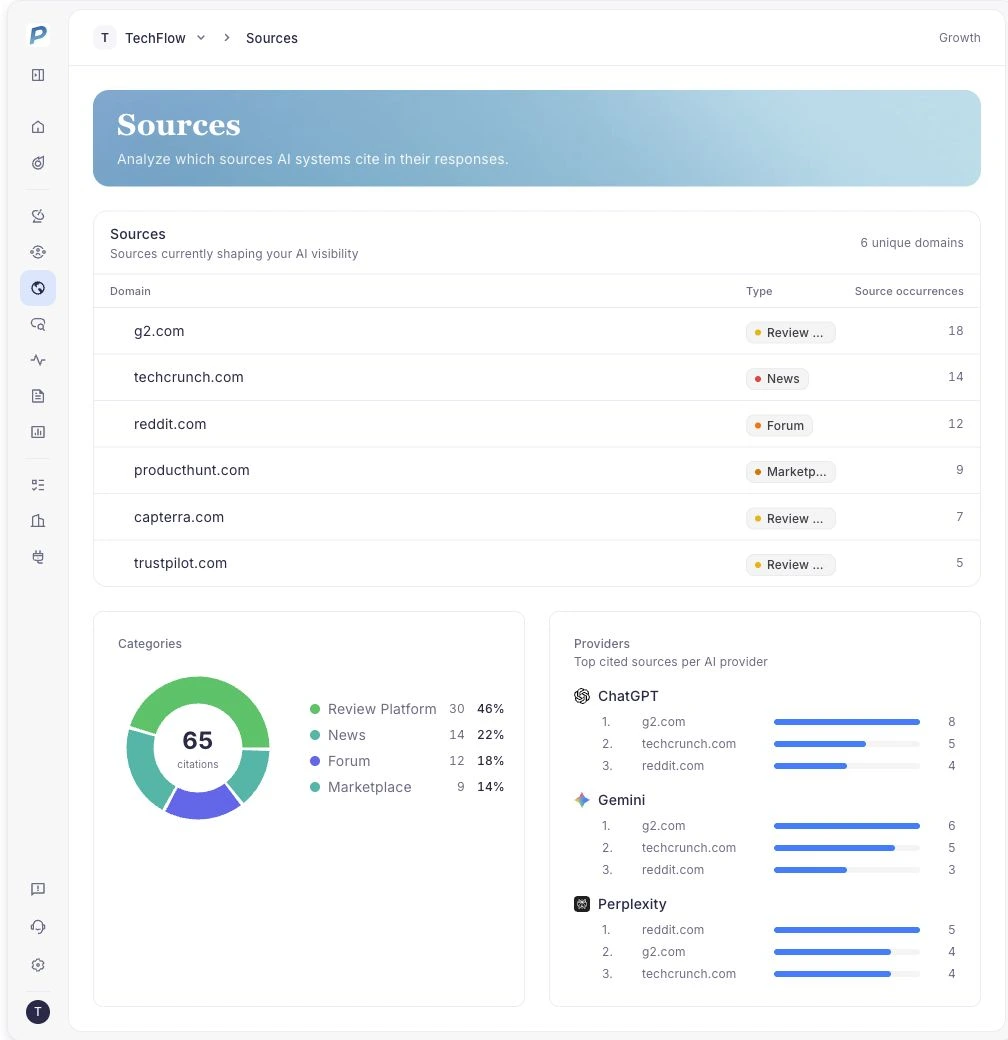
Public PromptScout demo capture; the values shown are illustrative.
For a broader setup guide, see how to monitor Google AI Overviews. For a closer look at the difference between a citation and a recommendation, see Cited Is Not Recommended.