
PromptScout Blog
ChatGPT Plugin Discovery: Should Your SaaS Build One?
Decide whether a ChatGPT plugin fits your SaaS. Choose a useful customer task, test discovery, and measure completed work separately from brand mentions.
Published

Founder
Building PromptScout to help teams understand how AI assistants cite, mention, and recommend their brands.
Your brand in AI answers
See where AI recommends your competitors.
Start with a free visibility check. Paid plans add monitoring; Growth adds Opportunities.
Paid monitoring: ChatGPT Gemini AI Overviews Perplexity Bing Copilot
Build a ChatGPT plugin when it lets customers complete a useful task with your product inside a conversation. Start with work that needs your software's data or actions, such as checking live availability or preparing a project estimate. Measure whether people complete that task. A plugin listing, a brand mention, and a website citation each tell you something different.
Summary
Start with a task customers already need: finding an appointment, retrieving current campaign figures, or preparing an estimate from account data. A writing tool needs a specific benefit beyond text ChatGPT can already produce.
Test suitable and unrelated requests, then check the result. Keep brand mentions, website citations, plugin discovery and completed tasks in separate records. An agency advising a SaaS client can use the checklist and examples below to scope that work.
What OpenAI changed
At DevDay on September 29, 2026, OpenAI announced improved plugin discovery: ranking and recommendations in the directory and within conversations. It also introduced extensions for sidebar apps, interactive panels and file viewers. Users choose which plugins to use and approve their access.
Availability depends on the feature and surface. The extension documentation says web extensions for Free and Go users are coming soon, while composer mentions are available only in the desktop app. Check the specific feature your customer needs before planning a launch around it.
A plugin extends what someone can do with your product in ChatGPT. Being recommended as software in a buyer's research answer is a separate outcome. The announcement does not establish that releasing a plugin increases citations to your website.
Plugin build checklist
Write the proposed task in a sentence: “A customer asks for [result], and our product supplies [data or action] needed to finish it.”
For a hypothetical scheduling service: “A customer asks for an appointment next week, and our product supplies current availability and creates the booking after confirmation.” The useful result is a confirmed appointment. A description of the scheduling company would not finish that task.
For a hypothetical agency reporting tool: “A consultant asks which campaigns need attention, and our product supplies the client's current campaign figures.” Decide what makes the output usable, such as a dated report with links to the campaigns. Keep interpretation separate from actions that change a campaign.
Before committing development time, check:
- Customer need: Can you name an existing task customers ask you to simplify?
- Product contribution: Does the task need data, permissions or functionality your product provides?
- Usable result: Can a customer inspect the result and tell whether the task finished?
- Maintenance: Can the team support authentication, changing product behavior and failed requests?
If the main goal is to make ChatGPT describe your company accurately, start with your public product information and AI visibility measurement. An integration adds work that clearer documentation may not require.
Test when ChatGPT should use it
OpenAI's metadata guidance recommends testing requests that name your product, requests that describe a suitable task without naming it, and requests another tool should handle. Write the expected behavior before running the checks.
For that hypothetical scheduling service, try these requests:
- “Use [product] to find my available appointments.” The plugin should handle the request if the account is connected.
- “Find an available appointment next week.” This tests whether ChatGPT selects the plugin for a suitable task without its name.
- “Explain how appointment scheduling works.” A general explanation should not need access to the customer's calendar.
Record the request, expected behavior, selected tool and result. Keep cases where access is unavailable separate from cases where ChatGPT chose the wrong tool. A successful check with a connected test account does not establish how often new users will discover the plugin.
Describe the task and its limits plainly in your plugin metadata. Recheck the same requests after a description changes. Use the submission guide to prepare the package, resolve review findings and publish after approval; a local working version is not a public directory listing.
Measure each outcome separately
Use the record that matches the question you want answered:
| Question | Evidence to keep |
|---|---|
| Did the buyer hear about the brand? | Saved answer naming it, with the buyer's question and date |
| Did the answer show a website link? | The displayed citation and its destination |
| Did someone find the plugin? | An observed directory visit or in-conversation recommendation, where available |
| Did the plugin finish useful work? | The request, tool result and confirmed task outcome |
| Did that work help the business? | A defined action, such as an activated account or completed booking |
If discovery events are unavailable, record that gap. A tool call can show use without telling you how the user found the plugin. Likewise, a displayed citation cannot establish an installation or a completed task.
Historical answer data shows why even the earlier steps need separate counts. In our source-and-mention audit, a brand's website appeared in the saved source list for 131 answers. The brand name was detected in 119 of them and was not detected in 12.
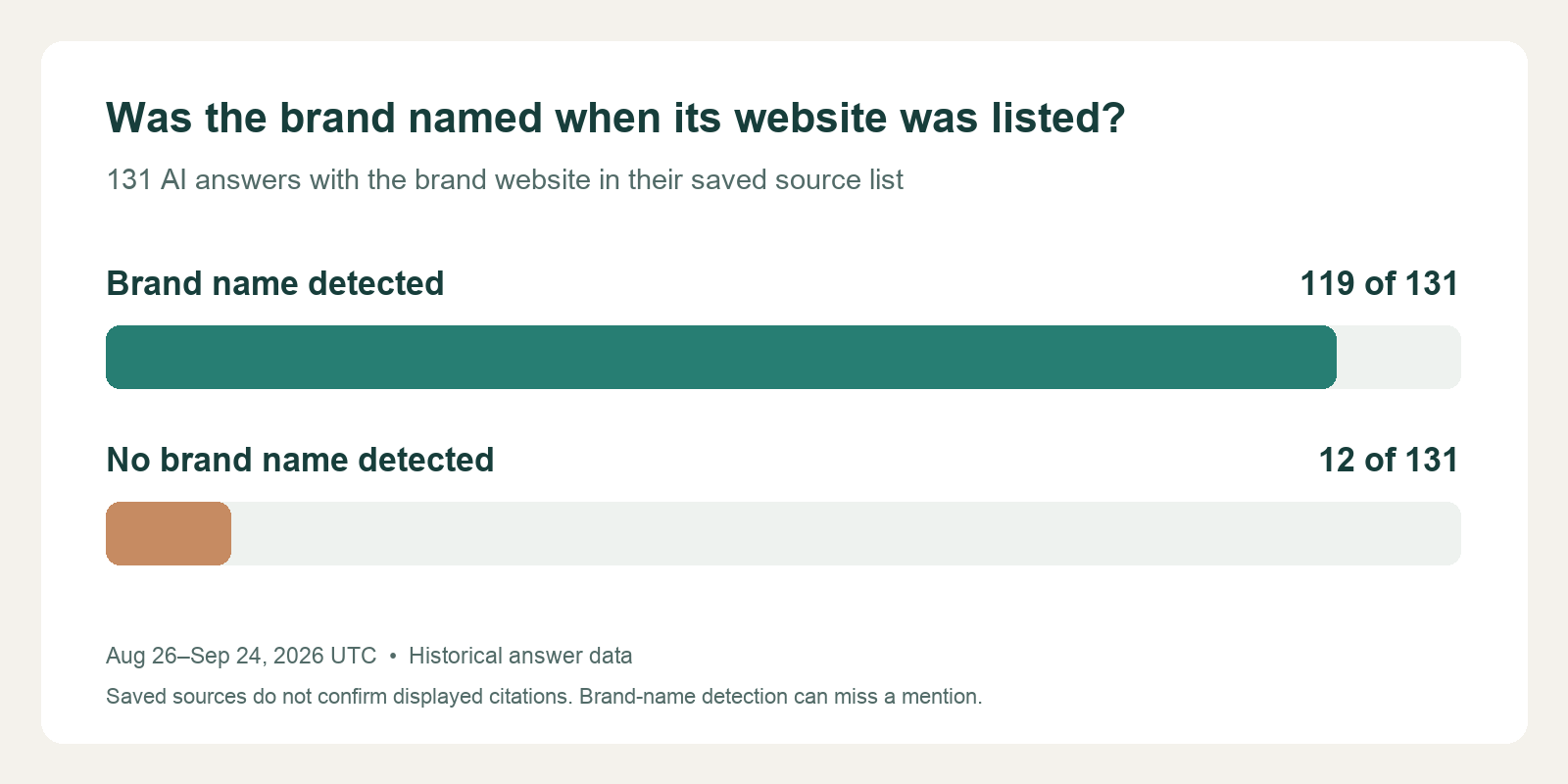
A website in the source list did not mean the brand was named. This older sample does not measure the September discovery update or plugin use. Saved sources are not a verified count of links shown to readers.
Use that distinction in your report: “We observed [brand mentions], [displayed links] and [completed plugin tasks] during [period]. Plugin discovery was [measured / not measured].” Keep each figure's source attached.
Using PromptScout
Use PromptScout's Monitoring to review answers to the buyer questions you track, then inspect associated pages in Sources. Check brand wording and displayed links in the saved answer. Keep plugin discovery, tool calls and completed tasks in a separate record from answer visibility. Supported providers are ChatGPT, Gemini, Google AI Overviews, Perplexity and Bing Copilot. Direct OpenAI model API responses can differ from user-facing ChatGPT answers, so they cannot substitute for those answers in a visibility comparison.
Notes on the data
The chart reuses anonymized monitoring data, rechecked on September 30, 2026. Its window is August 26 through September 24, 2026 UTC: 731 completed answers across 62 tracked questions and five brands. The plotted subset contains 131 answers with a saved source URL matching the brand's website; multiple matching URLs count once per answer. Brand-name detection can miss a mention. This selected sample measures neither recommendations, displayed citation links, visits nor plugin outcomes. OpenAI's launch and documentation provide the plugin feature claims, checked September 30, 2026.