
Competitor benchmarking guide
How to Compare Competitors in AI Answers
Compare competitors using the same buyer questions, collection conditions, and counting rules. Save the answers behind the scores and report missing coverage. A useful artificial intelligence (AI) benchmark shows where brands appear for a defined use case and gives the reader enough context to check the comparison.
By Łukasz Starosta · Published September 4, 2026 · Updated September 7, 2026
Summary
Generative engine optimization (GEO) needs a benchmark tied to a business decision. Choose the buyer, use case, and competitor list before collecting answers. Then keep the method fixed during the reporting window. Otherwise, a new question, added competitor, or changed collection setting can move the score without any change in how the same buyer question is answered.
Report the answer patterns that suggest work: an inaccurate product claim, an omitted use case, or a comparison that overlooks a relevant feature. Keep the underlying answer beside that finding. The score shows where to look; the specific claim determines whether to correct a page, inspect a source, or leave the result alone. A competitor's presence does not mean every difference requires a content task.
Choose the Competitors
Include products a buyer could use instead of yours for the defined job. For a repair shop choosing scheduling software, appointment booking and technician availability may matter more than broad workforce planning. A product without booking may sit outside that comparison even if it shares a market label. Write down the inclusion reason so the client can judge whether the roster fits the buying decision.
Record company names, product names, accepted spellings, and domains. Check ambiguous names in context instead of counting every text match. Keep the roster fixed during the window, and add newly discovered competitors at the next review. If the client needs an immediate addition, mark the report as a new version and explain which earlier results remain comparable.
Fix the Questions
Group questions by purpose: finding a product, comparing alternatives, or solving a problem. Keep questions that name a brand separate from unbranded discovery. A direct request about a company checks its description; a category question checks whether the answer introduces it. Combining those results hides a distinction the client needs when deciding whether the problem is awareness, accuracy, or fit for a use case.
Use wording that reflects the buyer's constraints, including region or language where relevant. Avoid adding praise, assumed features, or instructions to recommend a product. Keep a reason for each question and reject near-duplicates that merely rephrase it. The group should cover distinct decisions rather than provide repeated chances for a preferred brand to appear.
Keep Collection Consistent
Save the exact question, provider, product surface, exposed model label, time, and available settings. For independent questions, start without earlier conversation context. For follow-ups, preserve the conversation as part of the test. Record hidden settings as unknown. A browser session and an application programming interface (API) request may produce different answers, so keep their results separate unless that difference is the subject of the comparison.
Apply the same retry and review rules to every brand. A failed request has no assessed answer; a name with unclear meaning needs review. Neither should become an absent-brand result by default. Repeated collection can help describe variation, but only if the same questions and rules remain in place. Retrying until the answer looks right selects for the result the report was meant to measure.
Count Brand Presence
For each saved answer, classify the brand as present, absent, or ambiguous, and retain the passage supporting the decision. For an answer-level mention rate, count a brand once per answer. Divide answers containing it by successfully assessed answers in the stated group. Keep failed requests and unassessed answers outside that total, then report their counts so the reader can see the missing coverage.
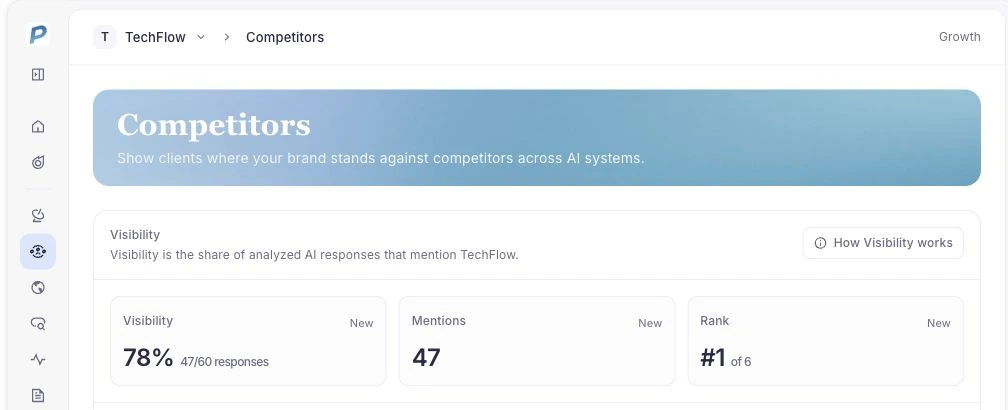
Report question groups separately before combining them. A group with more recorded answers contributes more weight to a pooled rate, even when every brand uses the same formula. State any weighting and use the same assessed set when comparing brands. If ambiguous names prevent that, show the coverage difference instead of presenting the scores as directly comparable.
Compare the Evidence Behind Tools
A shared metric name does not make reports interchangeable. An existing response index, custom question tracking, and a manual browser check can cover different questions and conditions. When comparing tools, ask whether they can provide the wording, saved answer, date, provider, and classification behind the result. Check the source of the report before trying to reconcile its score with another product's dashboard.
Keep citations separate from brand presence too. A page can be cited without its owner being recommended, and a brand can appear without a link to its site. Search candidates form another record: they are returned source URLs, not necessarily displayed citations. These distinctions help the team identify whether a gap concerns product description, recommendations, or the pages linked to the answer.
Reporting Checklist
Before sending a report, check that it names the question set, competitor roster, collection window, provider, and metric definition. Include missing coverage and changes to the method. Use a sentence such as: “During [window], [brand] appeared in [count] of [assessed answers] for [question group] on [provider]. [Count] answers remain unassessed.” Follow it with the claims or questions that warrant review.
For content work, identify a page and a factual gap. Check whether the cited source is current, whether the product actually meets the use case, and whether the owned page explains that fit. Preserve accurate limitations rather than editing a page to mimic a favorable answer. More mentions after an edit show a sequence, not proof that the edit caused the change.
Using PromptScout
In PromptScout, check completed runs in Monitoring, inspect Competitors, and review linked pages in Sources. Keep the agreed method and version history in a worksheet. Before sending the report, check that its scope matches the collected records. If the method changes, compare unchanged questions where they still cover the same decisions; otherwise, start a new baseline.
For agency teams comparing platforms, use the agency AI visibility platform checklist to review provider evidence, bounded weekly work, and follow-up limits.
Documented options, not a leaderboard
These vendors publish documentation for AI visibility or competitor analysis. Coverage and measurement methods differ. Check each source against the question set and evidence requirements above.
- PromptScout
PromptScout documents competitor positions from monitored prompts, source and citation context, and a weekly evidence-to-action workflow. Check current provider and plan coverage, roster controls, aliases, and export or receipt behavior.
Competitor Tracking- Ahrefs Brand Radar
Brand Radar documents AI visibility metrics and custom prompts for tracking brand visibility in AI assistants. Confirm competitor views, provider and location splits, raw answers, and current plan access for your prompts.
Ahrefs custom prompts- Semrush AI Visibility Toolkit
Semrush documents an AI Visibility Toolkit for tracking how brands appear in AI search and reviewing visibility context. Verify competitor cohorts, location coverage, prompt controls, metric definitions, and underlying answer detail.
Semrush Toolkit guide- Otterly
Otterly's help center documents competitor tracking, comparison views, and prompt-detail analysis. Test citation detail, provider and location filters, competitor aliases, exports, and retention on the same prompts.
Otterly competitor tracking- Peec
Peec documents AI-visibility performance views for evaluating monitored results. Verify competitor dimensions, provider and location splits, raw answer access, and the score denominator.
Peec product docs- Profound
Profound documents Answer Engine Insights for overview, interpretation, and configuration. Check competitor roster behavior, provider or location scope, raw answer and citation access, and plan boundaries.
Profound Insights overview- GenRank
GenRank publishes a measurement methodology that teams can inspect before comparing AI visibility results. Confirm competitor benchmarking, provider, prompt, and metric scope for your plan.
GenRank methodology
Ahrefs metric definitions provide an additional check on denominators.
Notes on the data
The supporting snapshot contains 15 successful responses to 3 distinct questions across ChatGPT, Gemini, Google AI Overviews, Perplexity, and Bing Copilot. Each provider returned 3 responses, and every response contains answer text. Collection took place on September 6, 2026, between 00:01:33 and 00:01:55 in Coordinated Universal Time (UTC). The question set is the same across providers.
The unit counted is a successful provider response, not a brand mention, citation, or customer visit. These records describe a single collection window. The saved aggregate does not include reviewed competitor placements, mention rates, or repeat-run variation, so it cannot supply a competitor ranking. Private questions, answers, and customer details are omitted. The method above explains how to build a comparison from assessed answers; the scope counts alone do not demonstrate its effectiveness.